
Work with children, parents and contacts
Use Children & Families → Children for children and Children & Families → Parents & Contacts for the adults connected to them. Open the child’s enrollment when you also need the site, group or attendance dates.
Start with the child
Section titled “Start with the child”The Student record brings together the child’s details, parents and contacts, enrollments and documents. Check the name and date of birth before editing, particularly when two children have similar names.
Use the overview pencil to update the child details offered by the form, such as their name, preferred name or languages spoken.
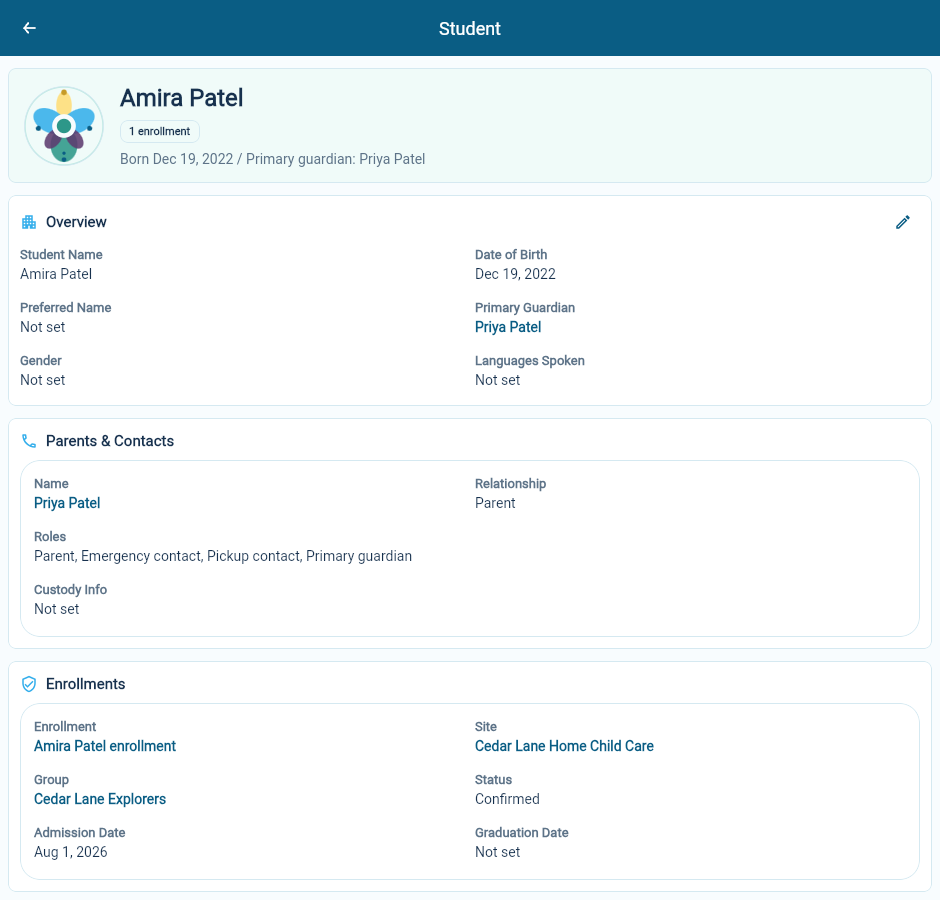
Read each person’s roles
Section titled “Read each person’s roles”The contact list distinguishes the person’s relationship to the child from what they are authorized to do.
| Label | What to check |
|---|---|
| Parent | The person’s parental relationship and contact details |
| Primary guardian | The main guardian identified on the child’s record |
| Emergency contact | Whether this is a person the team should contact in an emergency |
| Pickup contact | Whether this person is authorized to collect the child |
A person can have several roles. In the example, Priya Patel is shown as parent, primary guardian, emergency contact and pickup contact.
Do not infer pickup permission from a surname or from the fact that a person is a parent. Read the recorded roles and any relevant custody information.
Open the contact to check the details
Section titled “Open the contact to check the details”Follow the person’s name to their record. Check phone numbers, email and other saved information with the family when circumstances change.
Before creating another parent/contact record, search for the existing person. This is particularly useful for families with more than one child.
Keep placement and people separate
Section titled “Keep placement and people separate”A child’s name and family relationships describe the person. Their site, group and weekday schedule describe an enrollment. Update the record that owns the change so the information remains clear.
Likewise, the primary guardian and the billing contact are different responsibilities. Review Enrollment Agreement on the enrollment when the billing contact or guardian responsible for payment changes.
If a family record is missing
Section titled “If a family record is missing”Student and contact visibility depends on access to the sites connected through enrollments. Check the site’s access and any list filters before creating a replacement record.
To give a parent access to the Parent app, see Invite parents to the Parent app.