
Understand the enrollment journey
Admissions keeps the family’s enquiry, application and ongoing care records connected. They describe different stages, so knowing which record you need makes the work much easier.
Start with an enquiry
Section titled “Start with an enquiry”An Inquiry is a prospective family. Use it to keep contact details, the sites they are interested in, follow-up notes and visits together.
For example, Emma Wilson has toured Harbourview and wants to discuss an October start. Her inquiry record helps the team keep the next conversation in view.
Gather an application
Section titled “Gather an application”An Application brings together the proposed placement, the child’s details and the family’s information for review. It can begin as a staff-created draft.
A draft is work in progress. Submission means the information is ready for review; approval is a separate action.
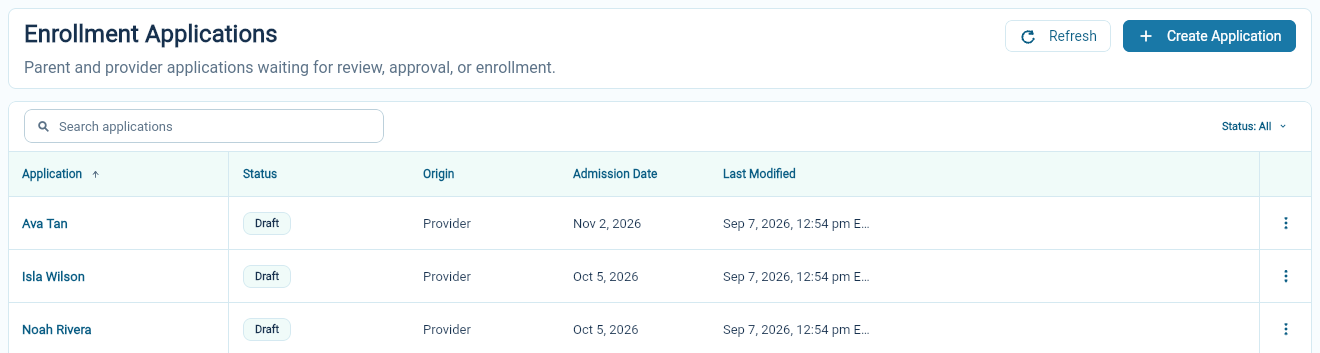
Prepare the information and manage applications.
Confirm the enrollment
Section titled “Confirm the enrollment”An Enrollment records the child’s care at a site and group over time. It includes the attendance schedule and links to family contacts, consents, documents and billing.
Approving an application creates the enrollment. Review the Enrollment’s invoice schedule during approval, then review the first invoice once its billing setup is complete.
Manage an enrollment and its schedule.
Keep the people current
Section titled “Keep the people current”The Student record describes the child. Parents & Contacts holds the people connected to children, including parents, emergency contacts and people allowed to collect them.
The enrollment describes the care arrangement. A change to a child’s phone contact and a change to their attendance schedule belong in different places.
Work with children, parents and contacts.
Choose the next task
Section titled “Choose the next task”For a new enquiry, start in Inquiries. For information waiting on a family or a reviewer, use Applications. For a child already attending, start with Enrollments or Children.
You do not need to recreate the same family’s records at each stage. Check for an existing record before adding another one.