
Prepare reusable document templates
A document template is the reusable starting point for a document you prepare for signing. It brings together the wording, the related document type and the information needed for a particular copy.
Open Documents → Templates to see the templates available to your organization.
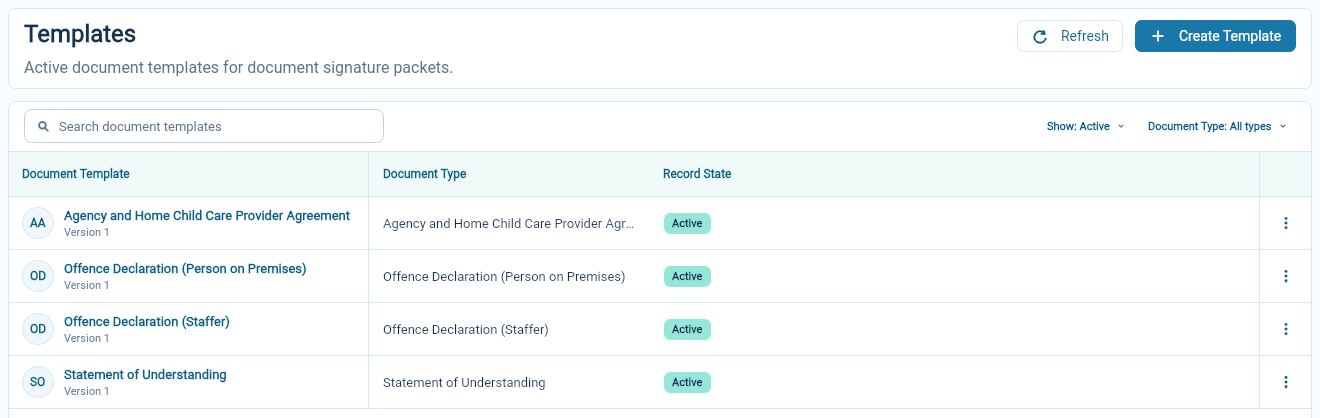
Check an existing template first
Section titled “Check an existing template first”Open the template and review its name, document type and version. Check the records it is intended to relate to and the people expected to sign.
A home-provider agreement and a staff declaration have different purposes. Choose by the document’s intended use rather than by a similar-looking name.
Prepare the wording and fields
Section titled “Prepare the wording and fields”Choose Create Template to start a new template. Enter its name, select the document type, and write the document in Document Markdown. Review Invitation Email as well as the document itself.
Some information can come from the linked records; other information may be entered when a signing request is prepared or completed by the signer.
Keep those responsibilities clear. A staff member preparing the document should know which values they must supply, and a signer should understand what they are being asked to read, answer or sign.
Preview and save
Section titled “Preview and save”Choose Preview in the document editor to check the layout and wording. Correct any problems reported by the preview before saving.
Choose Create Document Template to save a new template, or Create Version to save changes to an existing one. Check the saved name and version.
The template preview does not select a particular person or site. To check their names, dates and recipients in a prepared document, review the signing submission preview before sending it.
Keep track of versions
Section titled “Keep track of versions”Templates have version information. Use the version shown on a signing submission when you need to understand which wording was used for that request.
Review new versions before using them. Changing a reusable template should not be treated as changing an already completed signed document.
Use Archive when a template should no longer be offered in the active library.
Application forms are separate
Section titled “Application forms are separate”Enrollment application templates collect the family’s application answers. Document templates prepare documents and signing requests. Use application templates for the former and signing submissions for the latter.