
Find, upload and maintain documents
Use Documents → Documents to search stored files across the organization. To work with one child, enrollment, staff member or site, open that record’s Documents section and choose Open documents.
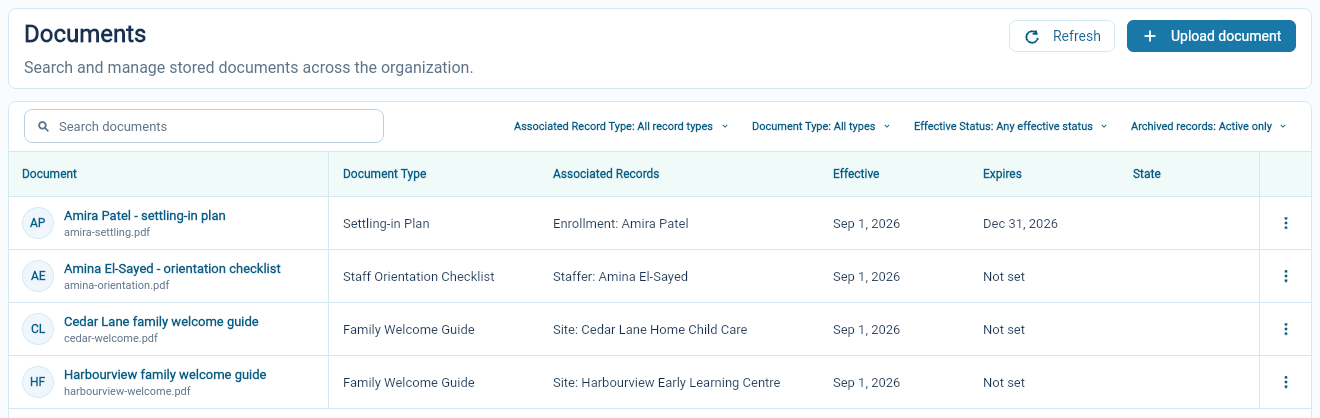
Find a file
Section titled “Find a file”Search by a useful word in the document’s name. Narrow the list by associated record type, document type or effective status when needed.
The associated record tells you who or what the file belongs to. Check it before opening or changing a document with a common title such as “Welcome guide.”
The archive filter lets you include material that has been removed from the active list.
Upload a document
Section titled “Upload a document”- Choose Upload document from the document list or the related record’s document actions.
- Choose the document type.
- Select the associated record or records required by that type.
- Choose the file and give it a useful title.
- Add any note, effective date or expiry date you need.
- Choose Upload from the document-list form, or Save when uploading from a related record. Check the saved file in Documents.
For example, a Family Welcome Guide can be associated with Harbourview, while a Settling-in Plan belongs to Amira’s enrollment. The document type determines which associations are available.
Review the details and download
Section titled “Review the details and download”Open a document to see its title, type, original filename, notes and dates. Choose Download to retrieve the file. Choose Edit details to update the descriptive information offered by the form.
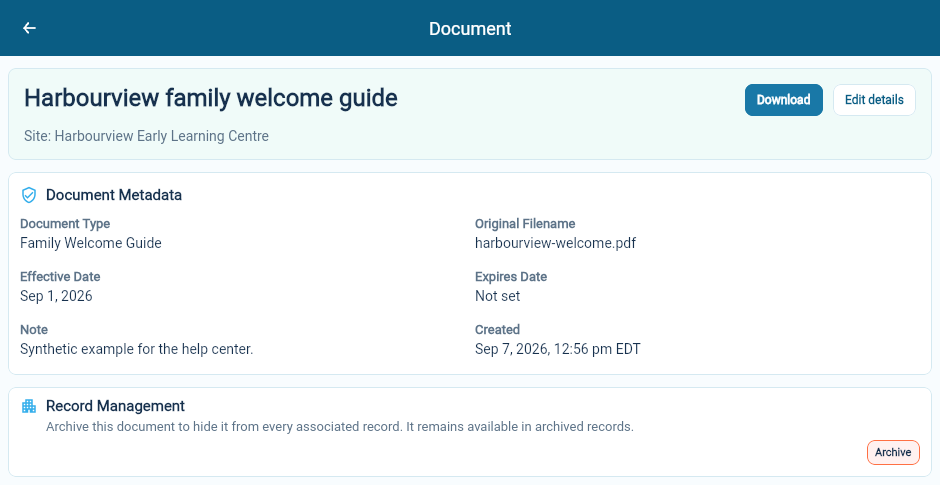
Changing the title or note does not replace the contents of the uploaded file. When you have a revised file, upload and identify the new document clearly, then review the older record.
Use dates and archiving deliberately
Section titled “Use dates and archiving deliberately”Effective and expiry dates help distinguish current, future and expired material. Check them when a file appears in an unexpected filtered view.
Archive hides the document from every record it is associated with. It remains available through archived records and can be restored with the available restore action.
A document uploaded here is a stored file. To request and track electronic signatures, use signing submissions.