
Organize your document types
A document type gives a file a recognizable category and determines which records it is linked to. It helps your team file similar material consistently.
Open Organization Settings → Document Types.
Review the types already available
Section titled “Review the types already available”Search before creating another type. You may already have the category you need, such as an enrollment agreement, a staff record or a site document.
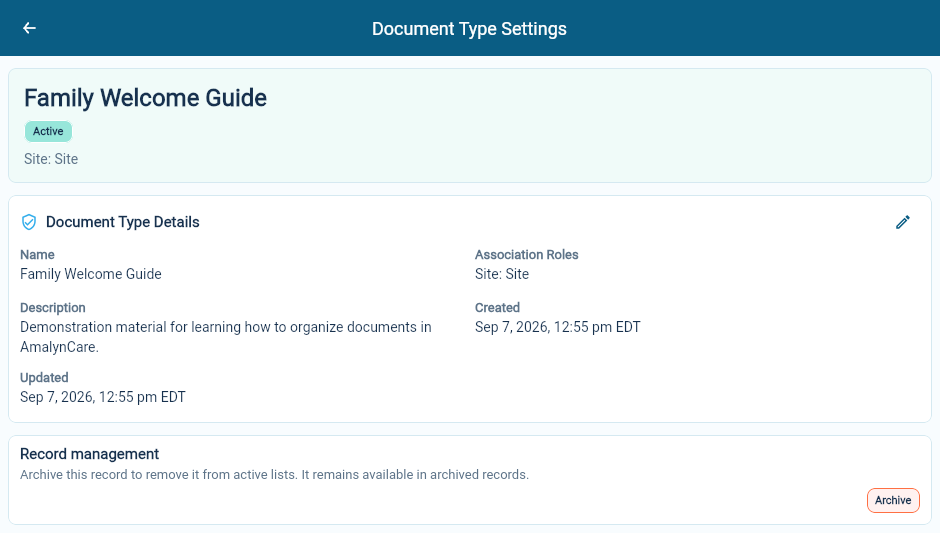
Open the type to check its description and Association Roles. These roles identify the records the document must be connected to.
Create a type
Section titled “Create a type”Choose Create Document Type, enter its name and description, and define the record associations it needs.
Use a name that describes the material rather than one particular person or file. For example, Family Welcome Guide is the type; Harbourview family welcome guide is a document title.
Choose the associations carefully. A site guide needs a site. A staff checklist needs the staff member. An agreement may need more than one record so the same document can be found from each relevant place.
Save the type and check the resulting details before using it for uploads or templates.
Keep later changes clear
Section titled “Keep later changes clear”The edit form lets you maintain a type’s name and description. Its record associations are part of the type’s original setup, so check those before creating it.
If a new kind of document needs different associations, define a suitable type rather than giving an existing category a misleading name.
Retire a type
Section titled “Retire a type”Use the archive action when a type should leave the active selection. Existing documents still need to remain understandable, so review the type and its use before retiring it.