
Check a child in and out
Use Attendance to record a child’s arrival and departure for a particular day. The same screen serves home child care groups and centre groups.
You need access to the site’s attendance and permission to change it. The child’s enrollment must be confirmed, cover the date, and include that weekday in its attendance schedule.
Open the day’s roster
Section titled “Open the day’s roster”- Go to Attendance.
- Choose the Site, then the Group.
- Choose the Date and select Refresh.
- Check the date under Daily Roster before recording anything.

You can also open attendance from a site’s Site Operations page. Still check the group and date before continuing.
Record an arrival
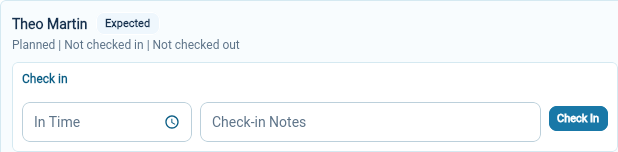
Section titled “Record an arrival”- Find the child’s row and its Check in area.
- Choose the arrival time in In Time.
- Add Check-in Notes if there is something useful to record.
- Select Check In.
The row changes to Attended and shows an In time. Check that the saved record belongs to the right child and day.
Record a departure
Section titled “Record a departure”- In the child’s Check out area, select the Pickup Guardian who collected them.
- Choose the departure time in Out Time.
- Add Checkout Notes if needed.
- Select Check Out and check the saved departure details.
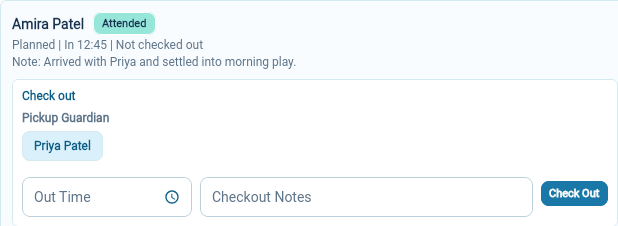
Choose a pickup guardian for an ordinary collection. If the right person is missing, review the child’s parents and contacts and pickup authorization before proceeding.
Record a departure to school
Section titled “Record a departure to school”A child in before-school care leaves for school without a guardian. Choose Left for school instead of a pickup guardian when recording that departure. The row keeps its Attended status and shows the visit as ended; the child is no longer counted as present.
Record a return the same day
Section titled “Record a return the same day”A child can be checked in again after any departure: a return from school in the afternoon, or a return after a mid-day appointment. Use Check In again on the same row. Each arrival and departure is kept as its own visit, and the day stays one attended day.
If an action is unavailable
Section titled “If an action is unavailable”A closed day displays a message explaining that attendance actions are unavailable. Check the operating calendar if the closure seems wrong.
For a missing child, follow the roster checks. If the child will be away, record a leave status instead of checking them in.