
Roles and access
A role describes a job in your organization, such as Centre Director, Educator, Accountant, Home Operator or Substitute Provider. You define the job once under Organization Settings → Access → Roles & Permissions, then give it to each staff member who does that job. The role decides what they can do in AmalynCare, whether they work as part of a Site’s team, and which notifications they can receive.
What a role can contain
Section titled “What a role can contain”One role can combine any of these parts:
- Organization permissions apply throughout the organization, such as View billing or View staff. The role editor shows them under Applies Everywhere.
- Operational permissions apply only at the Sites where the role is assigned, such as View children or Manage current and future attendance. The role editor shows them under Applies At Assigned Sites.
- On the Site team means holders work as members of the team at each Site where the role is assigned.
- Home operation means the holder operates the one home where the role is assigned, as its Home Operator. A role with home operation is always on the Site team.
- Notification categories decide which kinds of role-based notifications holders can receive.
A role does not need every part. An Accountant role may hold only Organization billing permissions. A Substitute Provider role may have no permissions at all and simply put the person on a home’s team.
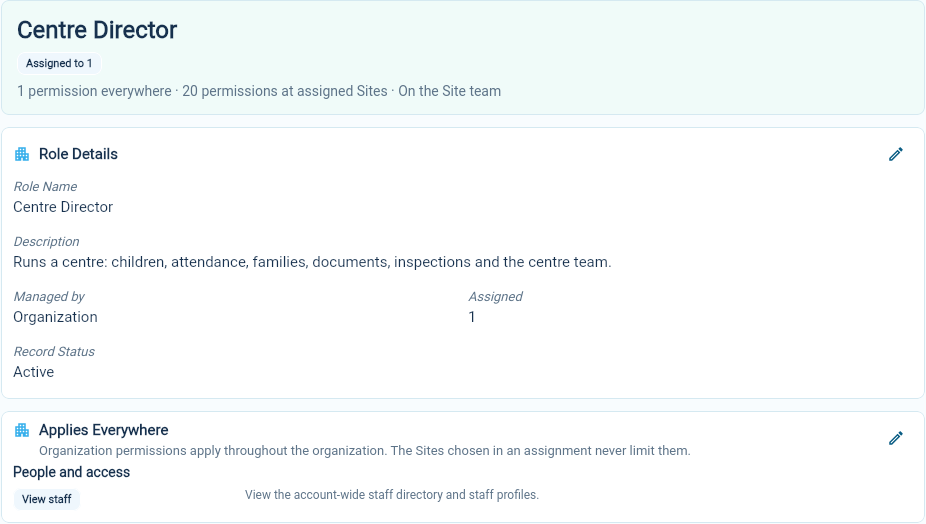
Because one role can mix these parts, you do not need separate “organization” and “operational” roles for the same job. In the example below, the Centre Director role holds View staff everywhere and 20 care permissions at the director’s Sites, and puts its holder on the Site team.
Role assignments
Section titled “Role assignments”A role assignment gives one role to one staff member and says where it applies:
- Selected Sites: only the Sites you choose.
- All Sites: every Site in the organization, including Sites added later.
- No Sites: no Site at all. The role’s Organization permissions still apply everywhere, but nothing else in the role applies at any Site.
You choose where an assignment applies separately from what the role contains, so any role can be assigned with any of these. No Sites suits a role that holds only Organization permissions, such as Accountant. A role with Operational permissions or On the Site team can also be assigned with No Sites; those parts then have no effect through that assignment. A role with home operation is the exception: it always applies at exactly one home. Assign, change and end roles explains each case.
A staff member can hold several roles. Their access combines across the assignments: Organization permissions from any role apply everywhere, and each Operational permission applies at every Site where one of their roles provides it. Ending one assignment removes only what that assignment provided.
Permissions take effect while the person can sign in to your organization. Being on a Site’s team and operating a home are recorded on the staff record, so they do not depend on sign-in.
Site team and access are different
Section titled “Site team and access are different”A Site’s team is the staff whose roles are on the Site team and are assigned at that Site. The team decides who takes part in the Site’s staff care-team conversations and in conversations with the families of children placed there.
Team membership and access are separate:
- Being on a team adds no permissions. Each role supplies only its own permissions.
- Having permissions at a Site does not put someone on its team. A quality reviewer can open a Site’s records without working there.
The Site’s page shows both lists. See who works at a Site.
The Owner role
Section titled “The Owner role”Owner is a protected role provided by AmalynCare. It contains every Organization permission and has every Organization notification category on. It follows your organization’s Owners: adding someone on the Owners page gives them the role, and removing them takes it away. You cannot edit, assign, archive or end it directly.
A worked example
Section titled “A worked example”This example organization has a centre, Maplewood Child Care Centre, and a home, Lakeside Home Child Care.
| Role | Contents | Assigned to |
|---|---|---|
| Centre Director | View staff (everywhere); care permissions such as View children (at Sites); On the Site team | Leila Haddad at Maplewood |
| Educator | Care permissions such as View children (at Sites); On the Site team | Jean-Baptiste Laurent-Beauchamp at Maplewood |
| Site Quality Reviewer | Permissions at Sites; not on the Site team | Rachel Morgan at Maplewood and Lakeside |
| Accountant | Manage billing, View billing and View billing settings (everywhere); Billing notifications on | An accountant, with No Sites |
| Home Operator | Home operation, so also On the Site team | Lucas Tremblay-Martin at Lakeside |
| Substitute Provider | No permissions; On the Site team | Élodie Marie-Claire Desrosiers-Lafontaine at Lakeside |
Maplewood’s team includes Leila and Jean-Baptiste. Lakeside’s team is Lucas, its Home Operator, and Élodie. Rachel can open records at both Sites, but she appears under Access without team membership rather than on either team. The accountant can work with billing across the organization without access to children’s records.
If Jean-Baptiste is also given the Substitute Provider role at Lakeside, he joins Lakeside’s team as well. He gains no permissions there: his Educator permissions still apply only at Maplewood.
Roles and access guides
Section titled “Roles and access guides”The examples and screenshots use fictional demonstration records.