
Complete a site inspection
Use Site Operations → Inspections to record a check at a home or centre. Each inspection belongs to one site and uses a specific version of an inspection template.
Before you begin, have the appropriate template ready and make sure you have permission to create and update inspections at that site.
Start the inspection
Section titled “Start the inspection”- Open Site Operations → Inspections and select New.
- Choose the Site and Inspection Template.
- Set the Inspection Date and Inspection Time to the time of the check.
- Select Create Inspection.
- Review the site, date and template version on the new inspection.
Record what you found
Section titled “Record what you found”Work through the checklist. Choose Yes or No, enter a score for a score question, or choose N/A when the template permits it.
Use Note beneath a question to add helpful detail. For example, “Paper towel dispenser needs a refill” tells the next reader what needs attention.
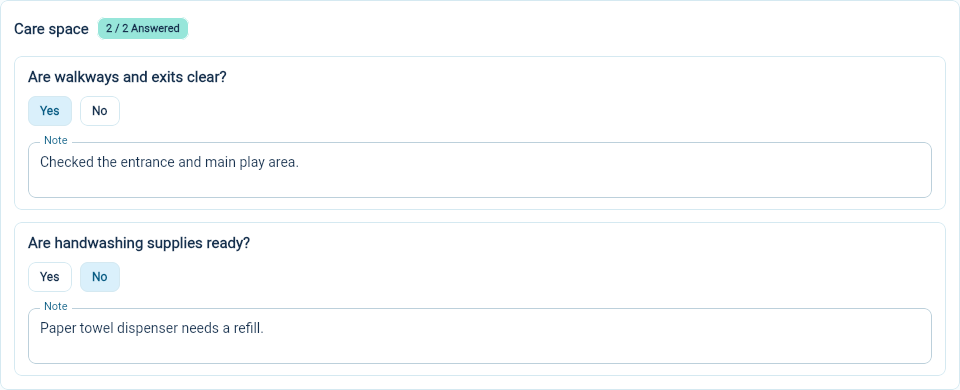
Select Save to keep your answers while the inspection remains open. The answered count beside each section helps you find questions you have not addressed.
Mark the inspection done
Section titled “Mark the inspection done”Every question needs an answer before you can mark the inspection done. Use N/A only where the template allows it. Review the whole checklist, save your changes, then select Done. The status changes from Open to Done.
A completed record preserves what was recorded during the check. Follow up on any problems using your program’s normal procedure.
Correct a completed inspection
Section titled “Correct a completed inspection”If you have permission to reopen inspections, open the completed inspection and select Reopen. If the action is missing, ask your administrator for help. Make the correction, select Save, then select Done again when the record is ready.
Use the inspection list’s Status filter to find open work or completed records. Check the site and inspection date when several entries use the same template.
For a copy of the completed checklist, download the inspection PDF.