
Manage an enrollment and its schedule
An enrollment records the care a child receives at a particular site and group. Open Children & Families → Enrollments, find the child and open the record.
Check the heading and site first, especially when a child has more than one enrollment.
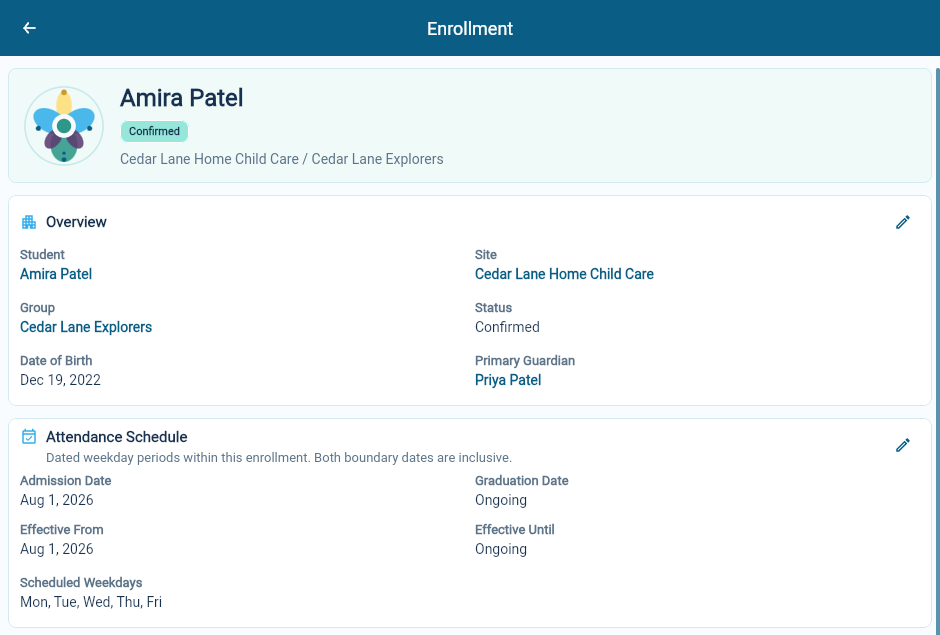
Review the placement
Section titled “Review the placement”The overview identifies the student, site, group, enrollment status and primary guardian. Follow a person’s or site’s name when you need the related record.
Use the overview pencil for the changes available in that section. Check the saved information after an edit.
Change the attendance schedule
Section titled “Change the attendance schedule”Choose Edit in Attendance Schedule. The schedule uses dated periods so a change can begin on a particular day instead of replacing the whole history.
Check the admission and graduation dates, each period’s start and end dates, and the selected weekdays. The start and end dates both count as part of the period.
For example, a child attends Monday, Wednesday and Friday through September, then starts attending Monday to Friday on October 1. End the existing period on September 30 and start the new period on October 1.
Review adjacent periods for accidental gaps or overlaps before saving. After saving, check that the viewer shows the intended dates and days.
Check contacts and consents
Section titled “Check contacts and consents”The enrollment shows the child’s Parents & Contacts and the roles those people hold. Confirm the emergency and pickup arrangements with the family whenever they change.
Use Add Consent to record a consent, its answer and the relevant dates or notes. An empty consent list means there are no consent records here; it should not be read as approval.
Understand children and family contacts.
Review billing and documents
Section titled “Review billing and documents”Check Enrollment Agreement for the billing contact and guardian responsible for payment, Financial Setup & Subsidy for subsidy authorizations, and Tuition Guarantees for agreed rates. Review these before running bills, especially after a schedule or funding change.
Set up enrollment billing and funding.
The Documents section opens material filed against the enrollment. Use it for records that belong to this care arrangement; the child and parent records have their own document links.
When care ends
Section titled “When care ends”Keep the enrollment’s end date and status consistent with the actual arrangement. Review any remaining billing work separately. Ending care should not erase the history your team needs to understand earlier schedules and charges.