
See who works at a Site
Each Site’s page lists the staff who work there, grouped by role. It also lists, separately, people whose roles give them access to the Site without putting them on its team. Use it to answer “Who works here?” before you look at an individual staff profile.
Before you begin
Section titled “Before you begin”You need the View site staff permission at the Site. Without it, the Site’s page shows only its address.
Open the Site’s staff
Section titled “Open the Site’s staff”- Open Site Operations → Sites.
- Choose the Site to open Site Operations.
- Find the Details section.
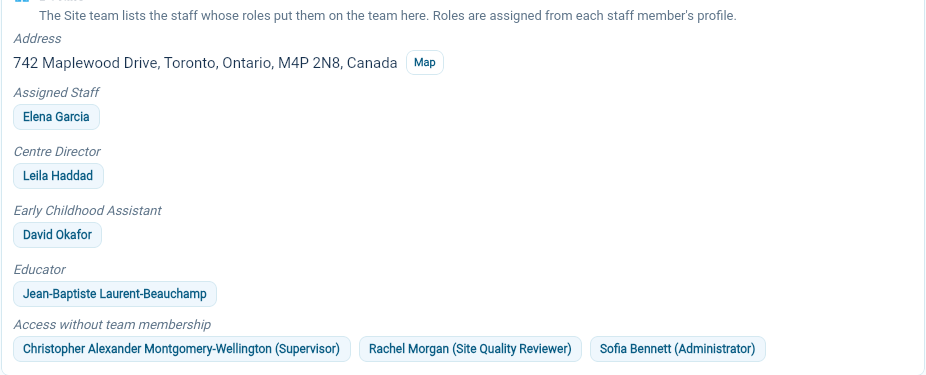
Details shows the Site’s address, then one row for each role on the team, with the staff members who hold it. Someone with two team roles at the Site appears under both. Select a name to open that person’s staff profile.
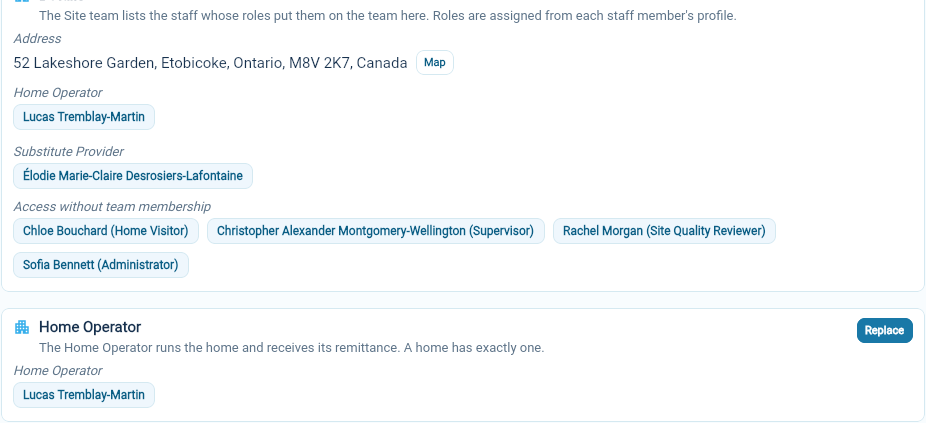
Access without team membership lists currently employed staff whose roles give at least one Operational permission at this Site without putting them on its team. Each name shows the roles that give that access, such as “Rachel Morgan (Site Quality Reviewer)”. A role that covers the Site but has no Operational permissions, such as one with only Organization permissions, does not put anyone in this list.
For a home, a separate Home Operator section names the home’s operator. See Assign or replace a Home Operator.
Who is on the team
Section titled “Who is on the team”A staff member is on a Site’s team when they hold a role that is On the Site team and assigned at that Site, either by choosing the Site or through All Sites. Being on the team does not need any permissions. A Substitute Provider role with no permissions still puts its holders on the team.
The team decides who takes part in the Site’s staff care-team conversations and in conversations with families of children placed at the Site.
Team and access are separate
Section titled “Team and access are separate”- Being on the team adds no permissions. Someone on the team can open only what their roles allow.
- Holding permissions at the Site does not put someone on the team. That is why oversight roles, such as Supervisor, Site Quality Reviewer or Home Visitor in the examples, appear under Access without team membership.
Change the team
Section titled “Change the team”The team follows role assignments, so there is nothing to edit on the Site’s page itself. To add someone, assign them a role that is on the Site team at this Site. To remove them, end that role or remove this Site from its assignment.
If someone appears in the wrong list, check the role: open it and look at Work At Sites. Turning On the Site team on or off changes the teams of every Site where the role is assigned.
If someone is missing from both lists, check their staff profile. Their role may not be assigned at this Site, may have No Sites, or may be off the Site team without any Operational permissions. Staff whose employment has ended or has not started yet are not listed.