
Home remittance and later adjustments
Site remittance is the amount an agency owes for a home child care Site under its remittance policy. The Site has its own remittance schedule. Families can receive invoices on different schedules without changing the home’s entitlement for the same care.
Funding may cover part of the tuition, and the home’s policy can add other amounts. Home payment is therefore not simply the total of parent invoices.
Start with the home’s policy
Section titled “Start with the home’s policy”In Organization Settings → Billing → Site Remittance Policies, the agency can review the policy used by the home.
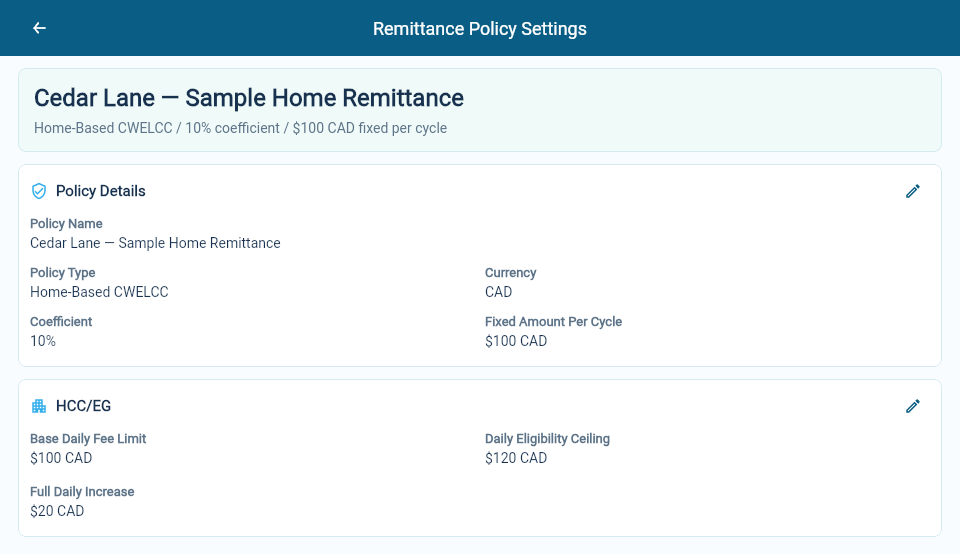
This is an example policy. The percentage, fixed amount and HCC/EG values are illustration settings, not prescribed rates.
Use the policy and advice to check these parts of the calculation:
- Base amount: the care amounts included for the children in the cycle.
- Percentage amount: the base amount multiplied by the policy’s percentage.
- Fixed amount: the policy’s cycle amount multiplied by open service days, divided by total service days. For example, 18 open days out of 20 gives 90% of the fixed amount.
- HCC/EG: an enhancement calculated by the home-based CWELCC policy when the completed period is reconciled. It is excluded from an advance. A generic policy does not calculate a new HCC/EG amount.
- Earlier adjustments: amounts brought into this cycle from previous work.
Check each line’s care period; some amounts belong to an earlier cycle.
A simple calculation
Section titled “A simple calculation”Suppose a home uses a generic policy with a 5% addition and a $10 fixed amount. The base care amount is $100, all service days are open, and there are no earlier adjustments or carried balances.
| Part | Amount |
|---|---|
| Base care amount | $100.00 |
| 5% of $100 | $5.00 |
| Fixed amount | $10.00 |
| Total owed to the home | $115.00 |
Use your home’s policy rates for its actual calculation. Include any HCC/EG amounts or earlier adjustments shown on its advice.
Advice, payable and payment
Section titled “Advice, payable and payment”These three records have different jobs:
| Record | What it tells you |
|---|---|
| Remittance advice | How the home’s amount was worked out. |
| Payable | What the agency owes the home operator. |
| Payment | What has actually been paid through the agency’s payment process. |
An advice or payable does not confirm a bank transfer. Check the agency’s payment information to confirm payment.
Advance and reconciliation
Section titled “Advance and reconciliation”Open Billing → Site Remittances and choose a date within the period you want to review. The Site’s schedule determines that period.
An Advance uses the expected care for the period. Reconciliation checks the completed period and deducts any advance already recorded for it. A reconciliation can also include an advance for the next eligible period; check each part’s dates separately.
Choose Preview advance or Preview reconciliation. Review the period dates, base entitlement, recorded advance, reconciliation, next advance, corrections, carryforward and payable total. Resolve any issues, then choose Run reviewed remittance when the preview is correct. If the facts change, open a new preview before running it.
The family’s Provisional and Final invoice runs do not run the Site’s remittance cycle. A due advance can be reviewed while an earlier reconciliation is waiting for the necessary completed care information.
Open a completed run and select Show captured pricing to see the tuition terms and pricing periods used. Compare the full pricing period with the dates included in the remittance. Show daily amounts displays the dated tuition and funding allocations retained with the run.
Later changes to a completed period
Section titled “Later changes to a completed period”For example, an unpaid closure recorded after an advance may reduce the amount due at reconciliation. An absence alone may leave the amount unchanged when the agreed care remains chargeable.
An attendance correction after a completed financial run can also change the Site’s recognized amount. The correction is reviewed separately from the family’s charges or credits. Later remittance calculations include only the remaining unapplied amount and retain the original period in the advice.
When a correction affects HCC/EG, the calculation reviews the whole Site period because children share the policy’s limits. Do not calculate the adjustment from one child’s difference alone.
If the correction overlaps two Site periods, review each period’s balance separately. Each keeps its own payee and application history, even when both came from one child’s invoice correction.
Carried balances
Section titled “Carried balances”A reduction can be larger than the current amount available to pay. The remaining balance can then carry forward and reduce a later payable, rather than appearing as a negative bank payment.
Review the opening balance, the amount used in this cycle and any balance left over. The carried balance belongs to the home site. When a home gets a new Home Operator, they become its payee; check the Site’s balance at the same time.
For an unexplained difference, compare the advice with the calendar, policy and earlier adjustments. Agency teams can follow billing for a home agency for the full routine.