
Archive or restore a role
Archive a role when the job no longer exists in your organization. An archived role stays in your records with its history but can no longer be assigned. You can restore it later. Roles are never deleted, so the record of who held a role and where is always kept.
Before you begin
Section titled “Before you begin”You need the Manage access roles permission to archive or restore a role. The protected Owner role cannot be archived.
A role can be archived only when no current staff member holds it. Check the Assigned count in the role list or on the role’s page first.
Archive a role
Section titled “Archive a role”- Open Organization Settings → Access → Roles & Permissions and select the role.
- In Record Management, choose Archive.
- Read the confirmation and choose Archive.
The role shows as Archived. It no longer appears when someone assigns a role, and its sections can no longer be edited. Past assignments remain in its history.
If the role is still assigned
Section titled “If the role is still assigned”If anyone still holds the role, AmalynCare does not archive it. A message titled with the role’s name and is still assigned lists the staff members who have it.
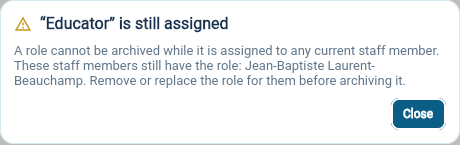
For each person, open their staff profile and end the role or give them a replacement role in Roles And Sites. See Assign, change and end roles. Then archive the role again.
If the role operates homes, give each home a new Home Operator through another role first. See Assign or replace a Home Operator.
Restore an archived role
Section titled “Restore an archived role”- In the role list, set Show to include archived roles, then select the role.
- In Record Management, choose Restore.
The role can be edited and assigned again. Restoring does not give the role back to its former holders; assign it to each person who needs it.